Match SMS phone numbers and tag to contacts, customize your view, and more.
Enhancements
SMS Filter and Tag
While using text messaging users will be able to:
- See possible matches associated with phone numbers while tagging a text message
- Create a new contact in tag message screen and establish the relation with the matter
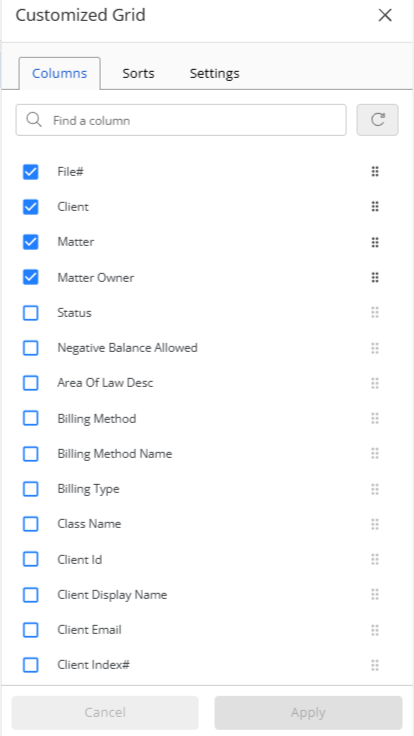
Customize Matter Split Billing Grid View
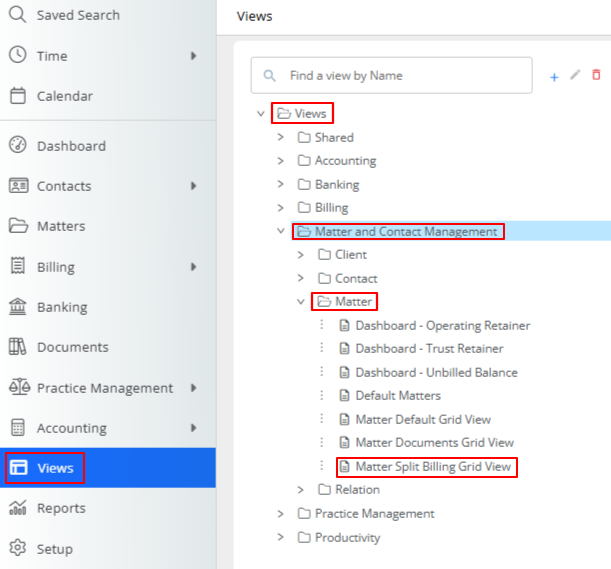
When configuring the Matter Split Billing Grid by navigating to Views > Matter and Contact Management > Matters > Matter Split Billing Grid View, users now have several more options to customize the column configuration.
|
|
Fixes
- System will retain any saved changes to grid settings.
- When applying a date range filter on the Balance widget in Dashboard, the balance totals will get updated.
- Users have the option to make successive deposits on the Trust Transaction Deposit screen with the Save and New option.
- When adding Trust deposit transactions from the Banking area, Client Matter names will display correctly in the drop-down.
- Users with CRM enabled will not experience an error when trying to access their CRM portal from the application.
- When clicking on View Details from the three dots drop-down in the Timecard list, users will be able to see the details of the selected timecard.
- If you select the edit mode for a dashboard, the edit functionality will be applicable only for the selected dashboard.
- Any filters selected when performing a split will be applicable only to the specific action.
- Editing event will display the correct date and time associated with the event.
- System will automatically change Chart of Account (COA) number based on bank type selection when adding a bank.
- When you delete a document for a billed time/expense, it will be removed from the document section of the time/expense card.
- In the Payment screen, the amount in the applied balance field will display only two decimal places.
- Adding/editing comments on the Matter Document page will not automatically refresh the page.
- When users add a contact, the side header navigation fields will be consistent with the entries on the Add Contact page.
- Any filters applied to the Communication inbox will display the correct data based on applied filters.
- The Trash section of Emails now includes the warning Messages that are in the Trash for more than 30 days are deleted automatically.
- Users will not see duplicate headers when accessing Transaction Levy.
- Users will be able to view details of the Split Billing enabled matters.
- Users will not be able to save any data that displays an error while making the entry.
- If you filter Intake Forms by Action Required, system will display the accurate data.
- Users will be able to use the Save button after enabling a matter for eBilling if all required fields are filled in.
- System will display correct value in custom field when you switch from custom field tab to another and then return to the custom field tab.
- Users will be able to select the timekeeper from the drop-down when setting up matter level fee allocations. (CL NG
- Users will be able record payment on invoices via check or cash without getting an error.
- The applied amount will be calculated accurately to show correct allocation in Operating Retainers.
- System will display only matter related invoices in invoice reminder screen when user removes Status = Unpaid filter.
- Users will not encounter a blank screen when:
-
- Switching between email pages
- When deleting emails from the expanded view
- When accessing View Details in Email History
- Accessing documents from the Matters screen
- When switching between tabs with filters applied in the Documents section
- Viewing details of the Split Billing enabled matters.