Improved invoice print setting, and more.
Enhancements
Invoice Header Height
We have now reduced the minimum height requirement for Invoice Header from 50 pts. to 25 pts. under Setup > Firm Settings > Invoice Settings > Invoice Print Settings.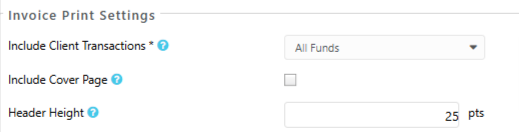
Fixes
- Users will be able to view time/expense, create invoice, calendar, task, notes, invoice, or banking screen on any screen resolution.
- User with time/expense entry role will be able to manage List Items under Setup if they have permission to do so.
- Client-Matter field will not be checked by default when entering events, task, notes from the global section.
- When you make any changes to amount, payee name, or any other field in the section above the 'Account' screen, it will be updated under the Account section as well.
- If a user cancels a report by navigating to Matter Details >Billing > Actions > Reports >Matter Billing Log, the report will not pop-up again.
- While Viewing/Editing a Client, user will be able to view Setup.
- User will be able to create views in Practice Management > Task/Phone messages with or without filters.
- User will be able to use Today option in the date drop-down while adding Accounts Payable bill or credit.
- While entering a Hard Cost, system will update the transaction method if user switches bank from operating to credit card type.
- User will be able to view applied filter in Calendar details view / Firm Timesheet.
- User will be able to unlink timecard from an event without getting a blank page.
- The Time Dashboard will display the Deleted hours on a timecard.
- When adding a Bank, if you leave the Account type blank, the Save button will be disabled.
- User will not be able to click on download button if transaction is not selected in download check screen.
- While using the Reconciliation feature:
- User will be able to view the correct count of selected transactions in the Reconciliation screen.
- When a user clicks on Reconciliation Details, they will see the relevant data.
- User will be able to clear/unclear transactions.
- User will be able to search and view details for contacts through global search.
- You will be able to sort the Email landing page according to the filter selected.
- While integrating with LawPay, the welcome screen will display the LawPay image.
- Conflict Check report will display the results in the order in which they appear on the screen.
- While viewing or editing a message, user will be able to view the client-matter associated with the message.
- When adding a new trust transaction, system will not refresh the screen when changing the matter in the transaction form.
- When a user adds or edits a transaction, a loading spinner will display while the form is being submitted.
- The system will print checks in the selected format without any breakage.
- User will be able to view corrects results in Timekeeper Utilization and Billing Summary after applying filters.
- User will be able to unshare a document once it is shared via the Client Portal.
- If an attachment is blocked by the document security setup, system will prompt an error while downloading the attachment.
- The Add/Edit View screen should appear without delay under Views.
- While adding bank withdrawal, the account field has been adjusted to view COA list.