Enhancements
New CosmoLexPay Canada Payment Processor
Canadian law firms that are not enrolled in our built-in payment processing app, can now enrol in CosmoLexPay and accept client payments through the new payment processing integration. With the new integration, users have a host of benefits.
-
Direct charge: Funds settle directly to law firms’ connected accounts, with Operating and Trust routing to maintain legal compliance. The firm appears as merchant of record on the cardholder’s statement, and dispute/chargeback liability sits with the firm’s connected account.
-
Gross settlement: Payments settle in full to the firm’s connected accounts.
-
Legal Compliance: Processing fees, dispute fees, and application fees are billed monthly from the firm’s operating account including fees incurred on trust transactions, so the trust account is never debited, preserving legal compliance.
-
Embedded onboarding: A hosted onboarding flow is embedded directly in the application. Verification is handled in the background, with progress and any required follow-ups visible in-app.
-
Account status and notifications: Real-time updates on account approval status, with firm admins notified by email and dashboard banner, plus a built-in notification to resolve pending issues directly.
-
Card acceptance: Accept credit card payments through existing in-app and Client Portal payment experiences.
-
PAD acceptance: Accept Canadian Pre-Authorized Debit (PAD) payments.
-
Payment receipts: Cardholders are automatically sent payment receipts upon payment completion.
-
Payouts: Automated payouts to the firm’s connected accounts on standard next day funding for card payments, and within five days for PAD schedules.
-
Dashboard: A CosmoLex Pay portal dashboard where firms manage their accounts, view transaction and payout details, and manage and respond to disputes.
-
Reports: Hosted reports on CosmoLexPay portal for balance summary, payout reconciliation, payments, disputes, and payouts list and details.
Customize Your Timesheet
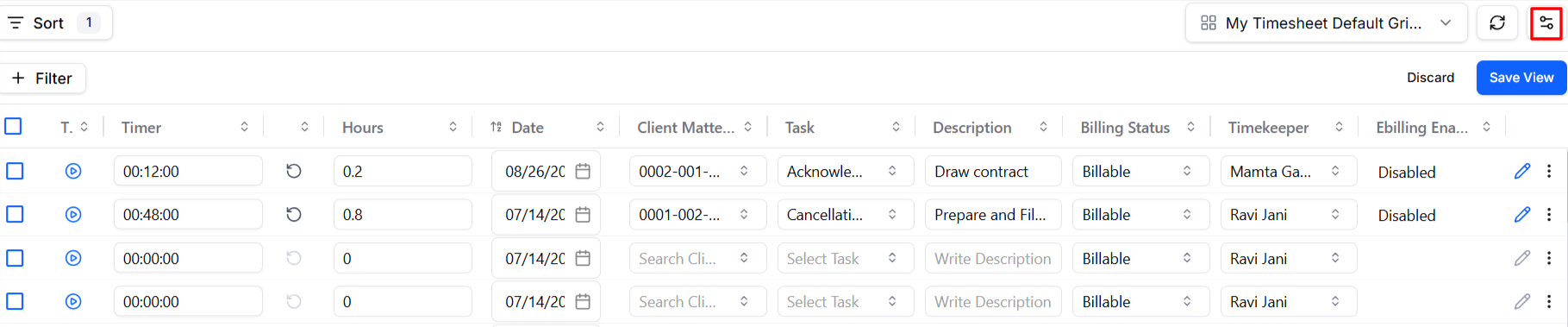
Tired of re-adjusting the columns and filters in your Timesheet every time you log in? With the option to configure and Save View in the timesheet, you can:
-
Build the view that works for you: Add or remove columns, resize rows and columns, and apply the filters you use most and save your view.
-
Pick up right where you left off: Navigate away, close the tab, log out for the day — your view comes back exactly as you left it next time you log in.
-
No changes to how you work: Time entry, posting, billing status, and totals all work exactly the way they always have.