The Global Add Shortcuts drop-down offers convenient access to common activities from any screen.
Access Global Add Shortcuts
To access the global add shortcuts:
- Toward the upper right of your screen, click the + (Quick Action) icon.
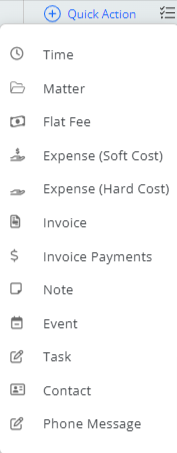
- From the shortcuts drop-down, click the desired activity.
The applicable screen opens:Activity Screen Time Add Timecard Matter Add Matter Flat Fee Add Flat Fee Expense (Soft Cost) Add Expense Expense (Hard Cost) Expense - Hard Cost Invoice Add an Invoice Invoice Payments Make an Invoice Payment Note Add Note Event Add Event Task Add Task Contact Add Contact Phone Message Add a Phone Message