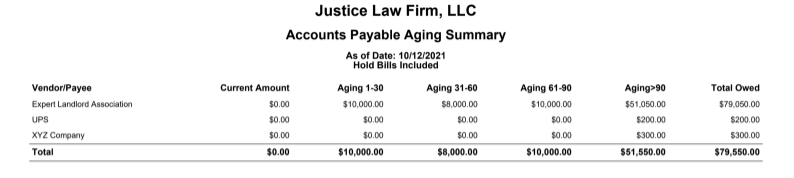
The accounts payable aging summary report categorizes payables to suppliers based on time buckets.
To access this report, go to Reports > Accounting >Accounts Payable Aging Summary
Report Filters

- As of Date: Select the date up until which you would like the balances to be included.
- Type: Choose: All, Client Expenses only, or Business Expenses only.
- Options: Include Hold, Don't Include Hold, or Only Include Hold
View/Download
Click View to preview the report or to download, select the preferred format (Excel/pdf) and click Download.
Sample Report