Public Intake Form Lock (Optional Feature)
Automatically lock a public intake form after submission so clients can no longer revisit or change it, with manual lock and unlock options inside the lead or case record.
CosmoLex CRM now offers a new optional feature called Public Intake Form Lock, designed to enhance your client intake process and protect submitted data. To receive access to this feature please reach out to your account manager/CRM support.
What Is the Public Intake Form Lock?
When this feature is enabled, the public intake form automatically locks immediately after submission. This means your clients will no longer be able to revisit or modify the form once it has been completed.
✅ Benefits
-
Prevents duplicate or conflicting entries
-
Ensures data accuracy and integrity
-
Reinforces a clear intake cut-off point
How Do I Know If a Form Is Locked?
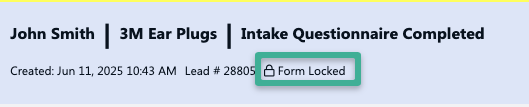
Once a form is submitted and locked, a “Form Locked” banner will appear at the top of the lead/case page within CosmoLex CRM.
What Happens When a Client Tries to Access a Locked Form?
If a client attempts to open a locked form link, they will see the following message:
“Intake Form Is Locked. Please contact your firm representative for further assistance.”

How to Unlock or Lock a Public Intake Form
You can manually lock or unlock a public intake form at any time:
- Navigate to the lead/case page.
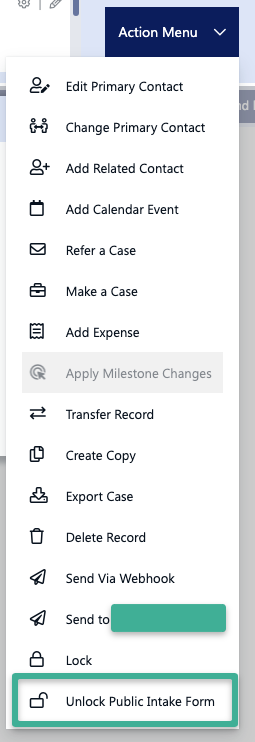
- Click the Action Menu (typically located in the top-right).
- Select either:
- Unlock Public Intake Form
- Lock Public Intake Form

Need Help/Have Feedback?
If you'd like this feature activated or need further assistance, please contact your CosmoLex CRM support representative.
Leave us feedback on this feature here:
https://form.jotform.com/251614745864161